
The Sepia Gallery
Duration
May 2022 - July 2022
Project Type
Mobile App
Role
User research, conceptualization, paper and digital wireframing, lo-fi and hi-fi prototyping, usability studies, and iteration of designs.
The Sepia Gallery App is a user-friendly visitor guide app for an imagined, mid-sized art gallery. The app features both permanent collections and rotating special exhibitions. It is designed to be lightweight and easy to use, providing visitors with useful navigation and educational information to enhance their experience at the gallery.
The Problem
Visiting a museum can be overwhelming, confusing to navigate, and crowded, particularly for individuals with accessibility needs, leading to inconvenience and discomfort for such visitors.
The Goal
Create a museum guide app that provides all essential information in one place, eliminating the need for renting audio guides and minimizing wayfinding issues for visitors.
User Research
The target audience for the app consisted of art enthusiasts from different age groups and professions. Despite the diversity in their life stages, museum visits were a shared enjoyable activity for most users. However, they faced challenges related to accessibility, limited time, financial constraints, and physical limitations that affected their experiences and willingness to visit museums.
Some of the user pain points are:
-
Accessibility
Small prints on labels and walls that are difficult to read in crowded spaces, and the cost of audio guides. -
Visiting Experience
Crowdedness in museums, which can hinder art appreciation. -
Performance
Performance issues with virtual tour apps that may run slowly or glitch on older or lower-spec devices, detracting from the user experience.
Meet Catherine, a persona based on our potential users.

To emphasize with users like Catherine, I thought about their physical experience at the museum and while using the app by coming up with user stories.


Wireframing and Prototypes
Given that the majority of app users will be present physically at the gallery, I placed a high priority on designing the gallery guide for easy navigation and search of artworks.

The app is designed with the assumption that users will likely be on-the-go while accessing it. As a result, elements are presented in a larger size and arranged in a simple layout, ensuring that they can be accessed quickly and easily.

As the project starts to take shape in a low-fidelity prototype, usability studies were conducted to observe how participants interacted with the interface and features of this app. The tests were conducted remotely, with 5 users asked to complete certain tasks and provide feedback.
From the user responses and studying their click paths, it was shown that:
-
Users needed better navigation
-
Users preferred text search
-
Almost all users are hesitant to try the camera search feature
-
For some users, icons and layouts appear to be confusing
Refining the Design
Changes were made to reflect the findings from the usability study.


High-Fidelity Mockup

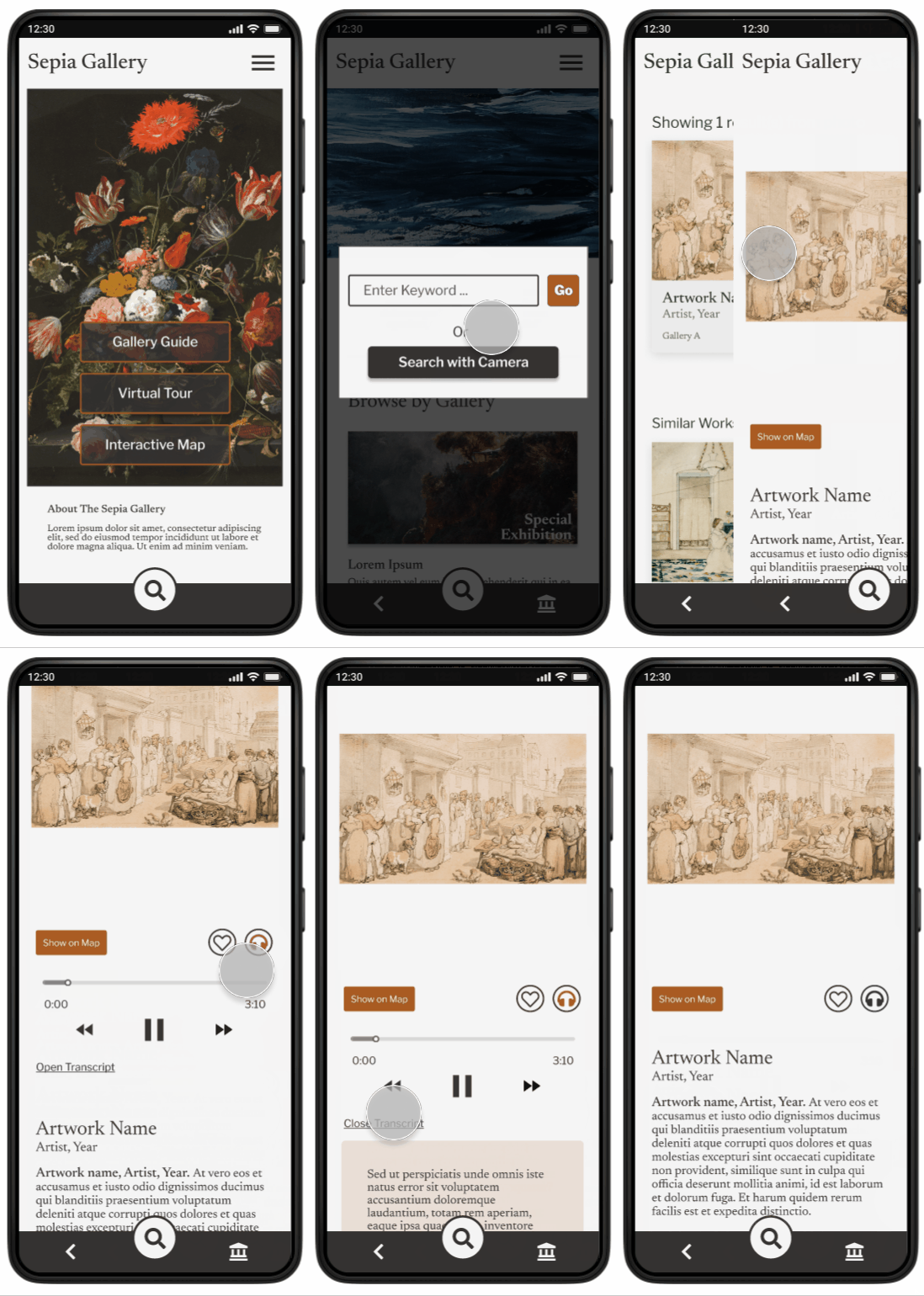
Camera Search Demo
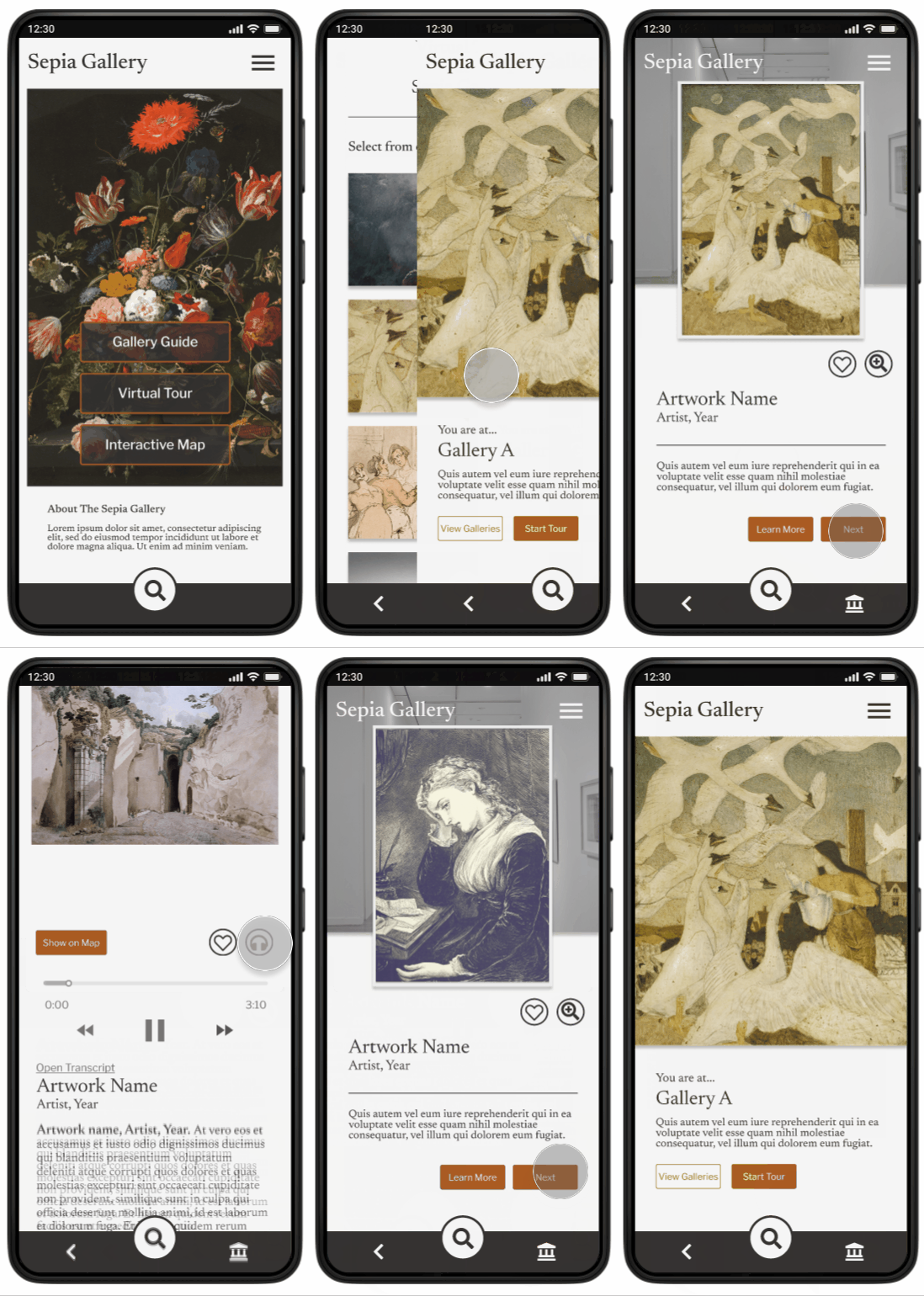
Virtual Tour Demo
Takeaways & Next Steps
My key learning from the project was the importance of empathy and understanding the diverse perspectives of users. Conducting interviews and usability studies helped me identify discrepancies in user experience, and I realized that what seems intuitive to me may not be so for others.
The next steps to take:
-
Conduct usability studies to identify pain points and areas of improvement.
-
Focus on enhancing accessibility features based on user feedback
-
Implement a side menu for improved navigation.